
Technology
5 Image to Video AI Tools for Businesses and Brands


Visual storytelling has become essential for businesses and brands trying to stand out in crowded digital spaces. Static images alone often struggle to capture attention, especially on fast-moving platforms where motion drives engagement. This is where image-to-video technology powered by artificial intelligence is reshaping how brands create content at scale.
Instead of relying on complex editing workflows, businesses can now transform simple images into dynamic videos that feel polished, intentional, and ready for distribution. From social media ads to product showcases and brand explainers, AI-driven image-to-video tools are helping teams produce more content with less friction.
In this blog, we’ll explore five image-to-video AI tools that businesses and brands can use to turn visuals into compelling videos. We’ll start with invideo and then look at other notable tools used across marketing, social media, and brand communication.
Why Image to Video AI Matters for Businesses
Before diving into specific tools, it’s important to understand why image-to-video AI is becoming a strategic asset for brands.
Faster Content Creation Without Heavy Resources
Traditional video production requires time, editing skills, and often a dedicated team. Image-to-video AI tools significantly reduce this complexity. By starting with an image and a short prompt or direction, businesses can create videos in minutes instead of days.
Higher Engagement Across Platforms
Motion content consistently outperforms static visuals across social platforms, landing pages, and ads. Turning images into videos allows brands to reuse existing assets while improving engagement rates and retention.
Consistent Brand Storytelling
AI tools help maintain visual consistency across videos, which is crucial for brand identity. Businesses can quickly adapt visuals for different campaigns without rebuilding content from scratch.
1. Invideo
Invideo is often discussed in the context of AI-powered video creation, but one of its increasingly relevant use cases is turning images into videos using artificial intelligence. At its core, the platform enables users to upload an image, describe what they want to see, and generate a short video based on that input.
In practical terms, invideo’s image to video AI capability allows businesses to add motion, transitions, and visual flow to otherwise static assets. This approach works well for brands that already have product photos, campaign visuals, or promotional images and want to extend their lifespan through video.
For example, an eCommerce brand can take a single product image and transform it into a short promotional clip suitable for social feeds. Similarly, service-based businesses can use branded visuals to create explainer or announcement videos without needing complex editing software.
What makes this approach valuable for brands is that it lowers the barrier to experimentation. Teams can test different visuals, messages, and formats quickly, which is especially helpful in performance-driven marketing environments. Instead of positioning itself purely as a traditional editor, invideo fits naturally into workflows where speed, adaptability, and visual storytelling matter.
2. Clipchamp
Clipchamp is another tool businesses often turn to when they want a simple way to turn images into short videos. It focuses on accessibility and ease of use, making it suitable for teams that don’t have dedicated video editors.
How Businesses Use Clipchamp
Brands typically use Clipchamp to create social media videos, internal communications, and basic promotional content. Users can upload images, arrange them into a sequence, and add motion effects, transitions, and text overlays to create a cohesive video.
Ideal Use Cases
Clipchamp works well for small businesses and startups that want to move quickly. It’s particularly useful for turning event photos, product images, or campaign visuals into short clips for platforms like LinkedIn or Instagram.
While it may not offer deep AI-driven visual generation, its image-to-video functionality is practical for straightforward business needs.
3. Wave.video
Wave.video positions itself as a video creation platform tailored for marketing teams. Its image-to-video capabilities are often used to repurpose visual content into videos optimized for different platforms.
Image to Video for Social Campaigns
With Wave.video, businesses can upload images and convert them into videos formatted for social ads, stories, and feed posts. This makes it easier to maintain consistent messaging across channels without redesigning assets.
Supporting Marketing Workflows
Marketing teams often use tools like Wave.video as an AI video maker app within broader content pipelines. Instead of treating video as a separate production effort, images can be quickly turned into videos that support ongoing campaigns, seasonal promotions, or announcements.
Wave.video is especially useful for brands that focus heavily on social media performance and need quick turnaround times.
4. Moovly
Moovly is commonly used by businesses for internal communications, training materials, and brand explainers. Its image-to-video features allow companies to transform visuals into informative videos without complex timelines.
Turning Images Into Explainers
Businesses often rely on Moovly to create videos that explain processes, products, or services. Starting with images or visual assets, teams can build structured videos that feel professional and clear.
Brand and Training Use Cases
Moovly works well for HR teams, corporate trainers, and internal communications departments that need to create videos at scale. Images from presentations, documents, or design files can be repurposed into video formats that are easier to consume.
This makes it a practical choice for brands that prioritize clarity and internal alignment.
5. Biteable
Biteable is another tool that brands use to turn images into short, engaging videos, particularly for marketing and social media.
Simple Visual Storytelling
Biteable focuses on helping users create short videos that communicate a clear message quickly. By uploading images and combining them with motion and text, businesses can produce content that feels dynamic without being overly complex.
Best for Quick Brand Messages
This tool is often used for announcements, promotional snippets, and brand highlights. For businesses that want to move fast and keep production lightweight, Biteable offers a straightforward path from image to video.
How to Choose the Right Image to Video AI Tool
With multiple tools available, choosing the right one depends on your business goals and workflows.
Consider Your Content Volume
If your brand produces content frequently, look for tools that allow quick iteration and reuse of images across multiple videos.
Align With Distribution Channels
Different tools shine on different platforms. Some are better suited for social ads, while others work well for internal communications or product explainers.
Balance Control and Speed
Some businesses prefer more control over visuals, while others prioritize speed. Image-to-video AI tools exist across this spectrum, so identifying your priorities helps narrow the choice.
The Growing Role of Image to Video AI in Brand Strategy
As attention spans continue to shrink, brands need to communicate more with less. Image-to-video AI tools are becoming a core part of modern content strategies because they bridge the gap between static visuals and engaging motion content. Instead of relying on lengthy production cycles, businesses can now use an AI video maker app to quickly transform existing images into videos that feel timely, relevant, and platform-ready.
By turning existing images into videos, businesses can extend the value of their creative assets while keeping up with the constant demand for fresh content. Whether it’s a product image transformed into a social clip or a branded visual turned into an explainer, this approach allows brands to stay agile without sacrificing quality. Image-to-video AI also enables faster experimentation, helping teams test formats, messaging, and visuals without significant resource investment.
Tools like invideo, Clipchamp, Wave.video, Moovly, and Biteable illustrate how image-to-video technology is no longer limited to professional studios. Instead, it’s becoming accessible to marketing teams, founders, and businesses of all sizes that want to scale visual storytelling efficiently.
Final Thoughts
Image-to-video AI tools are changing how businesses approach video creation. Rather than starting from scratch, brands can now build engaging videos from images they already have. This shift not only saves time but also encourages experimentation and creativity across teams.
As AI continues to evolve, image-to-video workflows will likely become even more intuitive and central to brand communication. For businesses looking to scale content without scaling complexity, adopting the right image-to-video AI tool can make a meaningful difference.
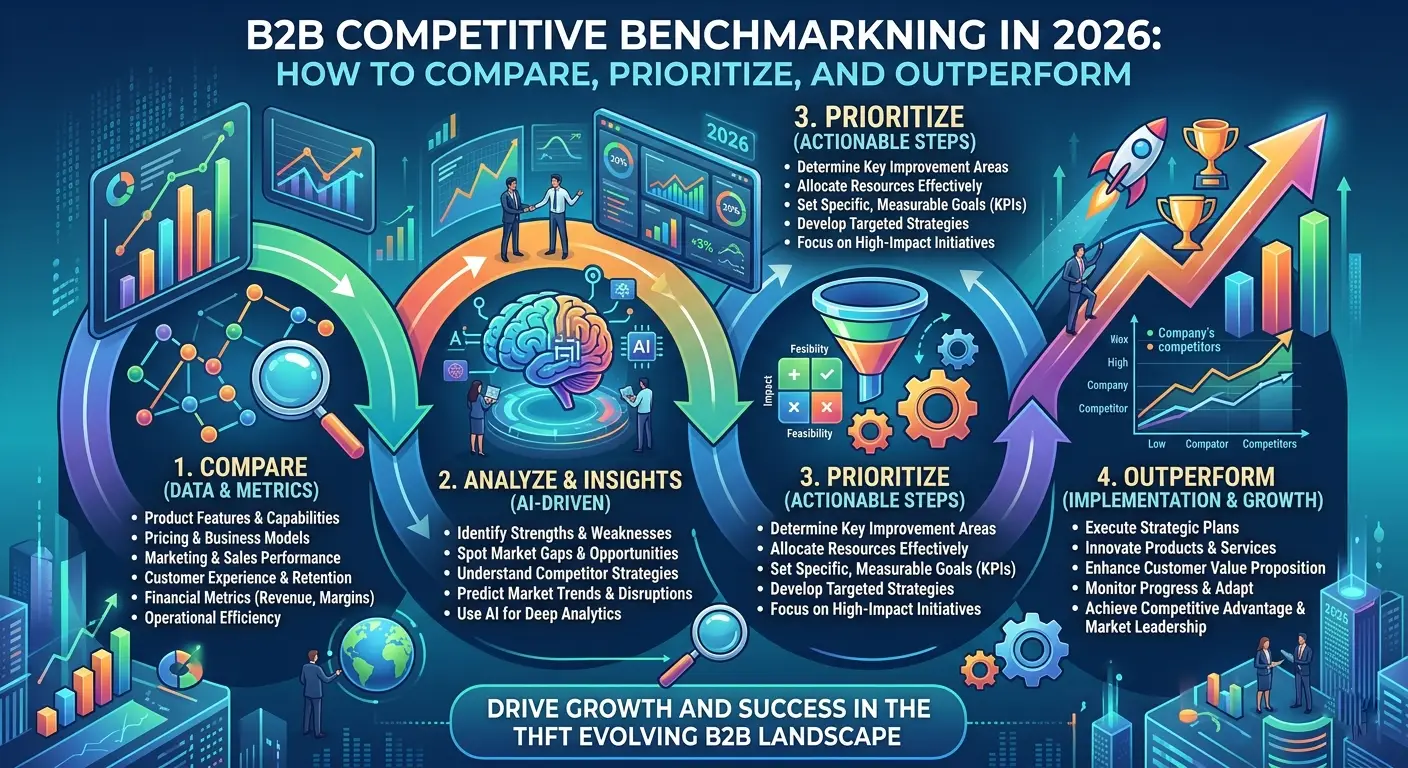
In 2026, B2B buyers do more research before they ever speak to a sales team. They compare brands, review websites, scan proof points, and judge credibility in minutes. That shift makes B2B Competitive Benchmarking far more important than a simple competitor check.
When done right, benchmarking helps businesses understand where they stand in the market and where they need to improve. It is not about copying rivals. It is about using evidence to make better decisions in marketing, sales, product, and UX.
Why B2B Competitive Benchmarking matters in 2026
The B2B space is more competitive than ever. Buyers expect clarity, speed, relevance, and trust at every stage of their journey. If your competitors deliver that better than you do, they win attention first.
That is why businesses need a structured way to compare performance, messaging, and customer experience. A casual glance at competitor websites is no longer enough. Teams need insight they can act on.
A strong benchmarking approach helps you:
- understand how your brand is perceived
- identify gaps in content, UX, and positioning
- compare your strengths against market expectations
- focus on changes that can improve results
- make decisions with more confidence
This is where competitive benchmarking for B2B brands becomes valuable. It turns scattered market observations into a clearer growth plan.
Start with the right competitors
Many companies make the mistake of benchmarking against everyone in their category. That usually creates more noise than value. A smaller, more focused list is much more useful.
The best approach is to group competitors by relevance. This gives your team a sharper view of who really influences buyer decisions.
You can break them into three types:
- Direct competitors
Companies offering similar services or products to the same audience - Aspirational competitors
Brands that may be larger or stronger, but set the standard in execution - Adjacent competitors
Businesses that solve a related problem and may still attract your prospects
A smart B2B competitor benchmarking exercise starts here. When you compare the right players, your insights become more practical and easier to turn into action.
What should you actually compare?
Good benchmarking stays focused. You do not need to track everything. You need to compare the areas that shape buying decisions and business outcomes.
A useful review usually includes the following categories:
- Brand positioning
Positioning tells you how clearly a company explains its value. In B2B, that matters because buyers want quick answers to simple questions: Who are you for? What do you solve? Why should they trust you?
Review areas such as:
- headline clarity
- value proposition
- industry relevance
- proof points
- calls to action
- differentiation
If a competitor explains its value faster and better, that is a signal worth paying attention to.
- Website and UX
A website often creates the first strong impression in a B2B journey. Even when the service is strong, poor structure or friction-heavy UX can reduce trust and conversions.
Look at:
- homepage flow
- navigation
- landing page structure
- mobile responsiveness
- form experience
- trust signals
- ease of finding key information
This part of the B2B Competitive Benchmarking process is especially useful because it reveals where digital experience helps or hurts performance.
- Content and search visibility
Strong B2B brands do not just sell. They educate, build authority, and answer buyer questions before the sales conversation begins. That is why content should be part of any review.
Check whether competitors are investing in:
- service pages
- blogs
- comparison pages
- case studies
- guides and resources
- keyword-focused content
- internal linking
A good competitive benchmarking process should show not only what content exists, but also how well it supports awareness, consideration, and conversion.
- Offer depth and delivery
Sometimes the gap is not in the service itself but in how the service is packaged and communicated. Buyers compare clarity just as much as capability.
Review things like:
- service scope
- deliverables
- onboarding flow
- implementation support
- niche expertise
- pricing visibility
This kind of competitor benchmarking often reveals why one brand feels easier to trust, even when the actual offering is similar.
How to prioritize what matters most
Not every difference deserves action. Some gaps are critical. Others are just surface-level variations that do not affect business performance.
After reviewing competitors, sort your findings into three levels.
- High priority
These are issues that may directly affect pipeline, conversions, or trust.
Examples include:
- weak service-page messaging
- unclear conversion paths
- missing proof points
- poor UX on key landing pages
2. Medium priority
These matter, but they are less urgent.
Examples include:
- uneven blog coverage
- weak CTA placement
- outdated content sections
- inconsistent tone or structure
3. Low priority
These can wait unless they support a larger business goal.
Examples include:
- minor visual changes
- trend-driven design updates
- features with little buyer relevance
This is where a practical competitive benchmarking strategy becomes useful. It helps teams move away from reacting to everything and focus on the areas that can make the biggest difference.
Turning insight into action
Benchmarking only creates value when it leads to better execution. A report on its own does not change outcomes. Teams need to use the findings in a practical way.
Different functions can apply the insights differently:
- Marketing can sharpen messaging and content direction
- Sales can improve objection handling and differentiation
- Product can spot unmet expectations in the market
- UX teams can reduce friction and improve digital journeys
Some businesses also use Competitive Benchmarking consulting, UX research services when they want a more detailed view of both user expectations and competitor performance.
Smarter Growth With B2B Competitive Benchmarking
In a crowded market, the strongest B2B companies are not always the biggest. They are often the ones that understand their market better and act faster on what they learn. B2B Competitive Benchmarking gives businesses a structured way to compare, prioritize, and improve without relying on guesswork.
For brands that want to turn competitive insight into stronger positioning, better digital experiences, and more informed decisions, Pattem Digital aligns well with that need through its research-led approach and focus on performance-driven digital growth.

In a world increasingly driven by data and precision, the concept of a tracqueur has evolved from a niche tool into an essential part of everyday life. Whether used for personal safety, fleet management, or asset monitoring, this technology is quietly shaping how we interact with our surroundings. Its presence spans industries, from logistics to healthcare, offering real-time insights that were once unimaginable. As connectivity improves and devices become smarter, the role of tracking solutions continues to expand. Understanding how this system works and why it matters can help individuals and businesses make more informed decisions. This article explores the depth, versatility, and growing importance of modern tracking systems.
Understanding the Core Function of Tracking Systems
At its foundation, a tracking system operates by collecting location-based data and transmitting it to a centralized platform where users can interpret it. These systems rely on technologies like GPS, GSM, and sometimes Wi-Fi triangulation to determine accurate positioning. The integration of sensors allows for more than just location tracking, enabling monitoring of speed, movement patterns, and environmental conditions. This layered approach makes tracking devices highly adaptable across different industries and use cases.
The concept behind a tracqueur is not just about knowing where something is, but understanding its behavior over time. Historical data allows for pattern analysis, helping users make predictions and optimize operations. For example, businesses can identify inefficiencies in delivery routes, while individuals can monitor personal safety or valuable belongings. This combination of real-time and historical insights is what gives tracking technology its strategic value in modern environments.
Will You Check This Article: Mietmakler Mastery: Smart Renting Made Simple Guide
Evolution of Tracqueur Devices Over Time
Tracking technology has come a long way from its early days, when systems were bulky, expensive, and limited in functionality. Early devices were primarily used by military and government agencies, with little accessibility for the general public. Over time, advancements in satellite technology and mobile networks made these tools more compact and affordable. This shift opened the door for widespread commercial and personal use.
Today’s tracqueur devices are sleek, efficient, and often integrated into everyday objects such as smartphones, vehicles, and wearable gadgets. They are equipped with advanced features like geofencing, motion detection, and real-time alerts. These improvements have transformed tracking from a specialized tool into a mainstream solution. The evolution reflects a broader trend in technology—making powerful tools accessible and user-friendly for everyone.
Applications Across Different Industries
Tracking systems are now deeply embedded in a wide range of industries, each benefiting from their unique capabilities. In logistics and transportation, they enable real-time fleet management, ensuring timely deliveries and reducing operational costs. Companies can monitor vehicle routes, fuel consumption, and driver behavior, leading to improved efficiency and safety. This level of oversight is essential in competitive markets where margins are tight.
In healthcare, tracking technology is used to monitor patients, equipment, and even staff movement within facilities. This ensures better resource allocation and enhances patient care. Retail businesses use tracking tools to manage inventory and prevent theft, while agriculture relies on them for monitoring livestock and equipment. The versatility of a tracqueur makes it a valuable asset across diverse sectors, demonstrating its adaptability and importance.
Enhancing Personal Safety and Security
One of the most compelling uses of tracking technology is in personal safety. Individuals can use tracking devices to monitor their loved ones, especially children and elderly family members. These tools provide peace of mind by offering real-time updates and alerts in case of unusual activity. In emergencies, quick access to location data can be life-saving, enabling faster response times.
Security applications extend beyond personal use to include property and asset protection. Vehicles equipped with tracking systems can be recovered more easily if stolen, while portable trackers can safeguard valuable items. The presence of a tracqueur acts as both a preventive and reactive measure, deterring potential threats and providing actionable information when needed. This dual role enhances overall security in a connected world.
The Role of Data in Smart Decision-Making
Data is at the heart of modern tracking systems, transforming raw information into actionable insights. By analyzing movement patterns, usage trends, and environmental factors, users can make informed decisions that improve efficiency and outcomes. Businesses, for instance, can optimize supply chains by identifying bottlenecks and adjusting strategies accordingly. This data-driven approach reduces guesswork and enhances productivity.
For individuals, access to tracking data can lead to better time management and resource utilization. Whether it’s planning a commute or monitoring fitness activities, the insights provided by tracking tools are invaluable. A tracqueur does more than just report location—it provides context and meaning to movement. This ability to turn data into knowledge is what sets modern tracking systems apart from traditional methods.
Privacy Concerns and Ethical Considerations
Despite its many benefits, tracking technology raises important questions about privacy and ethics. The ability to monitor location and behavior can be intrusive if not used responsibly. Users must be aware of how their data is collected, stored, and shared. Transparency from service providers is crucial in building trust and ensuring that tracking systems are used ethically.
Balancing convenience with privacy requires clear guidelines and informed consent. Organizations must implement robust security measures to protect sensitive information from unauthorized access. While a tracqueur offers significant advantages, it also comes with responsibilities. Addressing these concerns is essential for maintaining user confidence and ensuring the sustainable growth of tracking technology.
Future Trends in Tracking Technology
The future of tracking systems is closely tied to advancements in artificial intelligence and the Internet of Things (IoT). As devices become more interconnected, tracking solutions will become even more integrated into daily life. AI-powered analytics will enhance predictive capabilities, allowing users to anticipate events rather than simply react to them. This shift will further increase the value of tracking technology in both personal and professional contexts.
Emerging trends also include improved battery life, enhanced accuracy, and the development of smaller, more discreet devices. These innovations will make tracking tools more accessible and convenient for a wider audience. The evolution of the tracqueur will continue to reflect broader technological progress, pushing the boundaries of what is possible. As these trends unfold, the role of tracking systems will only become more significant.
Conclusion
The journey of tracking technology highlights its transformation from a specialized tool into a vital component of modern life. A tracqueur is no longer just about location—it represents a comprehensive system for understanding movement, behavior, and efficiency. Its applications span industries, enhance safety, and empower users with valuable insights. As technology continues to evolve, the capabilities of tracking systems will expand, offering even greater benefits.
However, with these advancements comes the need for responsible use and ethical considerations. Balancing innovation with privacy will be key to ensuring long-term success. By embracing the potential of tracking technology while addressing its challenges, individuals and organizations can unlock new opportunities. The tracqueur stands as a testament to how technology can transform the way we navigate and understand the world around us.
Read More: Pointmagazine.co.uk

In today’s rapidly evolving digital landscape, organizations are constantly searching for smarter, more adaptive frameworks that can unify data, processes, and intelligence into a single ecosystem. The concept of wptmqrl has emerged as a transformative approach that aims to streamline complex systems and enhance decision-making efficiency across industries. It represents a structured methodology designed to bridge gaps between automation, analytics, and real-time responsiveness. As businesses face increasing pressure to innovate, understanding such advanced frameworks becomes essential for long-term success.
The rise of intelligent infrastructures has made it necessary to rethink how systems communicate and evolve. Within this context, wptmqrl serves as a conceptual model that integrates flexibility, scalability, and performance-driven architecture. It is not just a technical structure but a strategic foundation for digital transformation. By exploring its principles, architecture, and applications, we can better understand how modern enterprises are reshaping their technological backbone to stay competitive in a data-driven world.
WPTMQRL Framework Overview and Core Principles
The wptmqrl framework is designed as a multi-layered conceptual system that focuses on optimizing data interaction, process automation, and intelligent decision-making. At its core, it emphasizes modularity, allowing systems to evolve without disrupting existing infrastructure. This approach ensures that organizations can adopt incremental improvements while maintaining operational stability. The framework also prioritizes adaptability, making it suitable for dynamic environments where requirements frequently change.
Another key principle of wptmqrl is interoperability. It enables different systems, applications, and data sources to communicate seamlessly. This reduces redundancy and improves efficiency across workflows. Additionally, it incorporates predictive intelligence, allowing systems to anticipate needs and respond proactively. These principles collectively form a robust foundation that supports both small-scale applications and enterprise-level ecosystems.
From a strategic perspective, wptmqrl encourages organizations to move away from rigid architectures. Instead, it promotes fluid systems that can self-adjust based on data inputs and operational demands. This flexibility is particularly valuable in industries such as finance, healthcare, and logistics, where real-time accuracy is critical. By aligning technology with business goals, the framework ensures long-term sustainability and innovation.
Furthermore, the wptmqrl model integrates continuous learning mechanisms. These allow systems to improve over time by analyzing past performance and adjusting algorithms accordingly. This self-evolving capability makes it highly relevant in today’s AI-driven environments, where adaptability is key to maintaining competitive advantage.
Will You Check This Article: Understanding “utanmazkızkar” and Its Impact Online
Architecture Design and System Components
The architecture of wptmqrl is built on layered components that interact in a coordinated manner. Each layer serves a specific function, ranging from data ingestion to processing and output generation. This separation of concerns ensures clarity, maintainability, and scalability within the system. It also allows developers to modify individual components without affecting the entire structure.
One of the defining features of wptmqrl architecture is its distributed nature. Instead of relying on a centralized system, it distributes workloads across multiple nodes. This improves performance and reduces the risk of system failure. Additionally, it enhances fault tolerance, ensuring continuous operation even under heavy loads or partial outages.
The system components typically include data processing units, integration modules, analytics engines, and control interfaces. Each component plays a vital role in maintaining the overall functionality of the framework. For instance, data processing units handle raw input transformation, while analytics engines extract meaningful insights. Together, they create a cohesive operational flow.
Security is also embedded within the architectural design of wptmqrl. Encryption protocols, access control mechanisms, and monitoring systems work together to safeguard data integrity. This ensures that sensitive information remains protected while still being accessible to authorized users. The architecture is therefore not only efficient but also secure and reliable.
Data Flow and Processing Mechanisms
In the wptmqrl ecosystem, data flow is designed to be continuous and dynamic. Information enters the system through multiple sources, including APIs, sensors, and user inputs. Once collected, it undergoes preprocessing to remove inconsistencies and prepare it for analysis. This ensures that only high-quality data is used in decision-making processes.
The processing mechanism within wptmqrl relies heavily on real-time computation. Instead of batch processing, the system evaluates data as it arrives. This allows for immediate insights and faster response times. Such capability is especially important in environments where delays can lead to significant operational inefficiencies.
Another important aspect is data transformation. Within the wptmqrl framework, raw data is converted into structured formats that can be easily interpreted by analytics engines. This transformation process involves normalization, classification, and aggregation techniques. These steps ensure that data remains consistent and usable across different system components.
Finally, the output stage delivers insights in a meaningful and actionable format. Whether through dashboards, alerts, or automated actions, the wptmqrl system ensures that processed data translates into real-world decisions. This seamless flow from input to output is what makes the framework highly efficient and valuable.
WPTMQRL in Modern Digital Ecosystems
The role of wptmqrl in modern digital ecosystems is becoming increasingly significant as organizations shift toward automation and intelligence-driven operations. It acts as a unifying framework that connects disparate systems into a single cohesive environment. This integration allows businesses to operate more efficiently and reduce operational silos.
In cloud-based infrastructures, wptmqrl enhances resource allocation and workload management. It ensures that computing resources are distributed optimally based on demand. This leads to improved performance and reduced operational costs. Additionally, it supports hybrid environments, making it suitable for both on-premise and cloud deployments.
The framework also plays a crucial role in artificial intelligence and machine learning ecosystems. By providing structured data pipelines, wptmqrl enables AI models to access clean and relevant datasets. This improves model accuracy and accelerates training processes. As a result, organizations can deploy intelligent solutions more effectively.
Furthermore, wptmqrl contributes to digital transformation initiatives by enabling seamless integration of legacy systems with modern technologies. This ensures that organizations can modernize without completely replacing existing infrastructure. The adaptability of the framework makes it a valuable asset in long-term technological planning.
Security, Scalability, and Optimization Techniques
Security within the wptmqrl framework is built on multi-layered protection strategies. These include encryption, authentication protocols, and continuous monitoring systems. Together, they ensure that data remains secure throughout its lifecycle. This is particularly important in industries dealing with sensitive information.
Scalability is another major strength of wptmqrl. The framework is designed to handle increasing workloads without compromising performance. Through distributed computing and load balancing, it can scale horizontally across multiple environments. This ensures consistent performance even during peak usage periods.
Optimization techniques in wptmqrl focus on improving system efficiency and reducing resource consumption. These include caching mechanisms, query optimization, and predictive resource allocation. By minimizing unnecessary processing, the framework enhances overall system responsiveness and reduces latency.
Additionally, continuous performance monitoring allows wptmqrl systems to identify bottlenecks and inefficiencies. This enables proactive adjustments that maintain optimal system health. As a result, organizations benefit from a stable and high-performing digital environment.
Industry Applications and Use Cases
The versatility of wptmqrl makes it applicable across a wide range of industries. In healthcare, it supports patient data management, predictive diagnostics, and real-time monitoring systems. This improves patient outcomes and enhances operational efficiency within medical facilities.
In the financial sector, wptmqrl is used for fraud detection, risk assessment, and automated trading systems. Its ability to process large volumes of data in real time makes it ideal for fast-paced financial environments. This helps institutions make informed decisions quickly and accurately.
Manufacturing industries also benefit from wptmqrl through predictive maintenance and supply chain optimization. By analyzing machine data, the framework can predict equipment failures before they occur. This reduces downtime and increases productivity across production lines.
Additionally, the framework is widely used in e-commerce platforms to enhance user experience, optimize inventory management, and personalize recommendations. Its ability to process behavioral data in real time makes it a powerful tool for customer-centric strategies.
Implementation Challenges and Solutions
Implementing wptmqrl can present several challenges, particularly in terms of integration complexity. Organizations often struggle to align existing systems with the new framework. This requires careful planning and phased implementation strategies to ensure smooth transitions.
Another challenge is data consistency. Since wptmqrl relies on multiple data sources, maintaining uniformity can be difficult. This issue can be addressed through standardized data formats and robust validation mechanisms. These ensure that all incoming data meets required quality standards.
Resource management is also a concern during implementation. The framework may require significant computational resources, especially during initial deployment. However, cloud-based solutions and scalable infrastructure can help mitigate this challenge effectively.
Finally, organizational resistance to change can slow down adoption. Training programs and awareness initiatives are essential to help teams understand the benefits of wptmqrl. Once properly implemented, the framework delivers long-term efficiency and performance improvements.
Conclusion
The future of wptmqrl lies in its ability to evolve alongside emerging technologies such as artificial intelligence, edge computing, and advanced data analytics. As digital ecosystems become more complex, the need for adaptive and intelligent frameworks will continue to grow. wptmqrl is positioned as a foundational model that can support this evolution effectively.
Looking ahead, wptmqrl is expected to play a central role in shaping next-generation digital infrastructures. Its emphasis on scalability, security, and real-time intelligence makes it highly relevant in a data-driven world. As organizations continue to prioritize efficiency and innovation, this framework will remain a key enabler of transformation.
Ultimately, wptmqrl represents more than just a technical system—it is a strategic approach to building smarter, more connected digital environments. Its continued development will likely influence how industries design, manage, and optimize their technological ecosystems in the years to come.
Read More: Pointmagazine.co.uk

Full Time Driver Service Dubai Own Sponsorship vs Outsourced Service

Couples Promise Rings: A Shared Commitment

7 Things to Know Before Buying an Evil Eye Bracelet

Top 7 US Cities Digital Nomads Are Choosing as Their Base in 2026

Byrutor Explained: Risks, Uses, and Digital Trends Guide
